---
title: Creating and managing business units
description: Organising staff and clients into groups
---
[Skip to content](https://support.connectworks.com/5608060-creating-and-managing-business-units#main-content)
[](https://www.connectworks.com/)
Open main navigation
Close main navigation
How can we help you?
- There are no suggestions because the search field is empty.
1. [Help Center](https://support.connectworks.com/?hsLang=en)
2. [Firm administration](https://support.connectworks.com/firm-administration?hsLang=en)
3. [STAFF MANAGEMENT](https://support.connectworks.com/firm-administration?hsLang=en#staff-management)
# Creating and managing business units
## Organising staff and clients into groups
Business Units can be used to organise your staff and clients into groups. You can create Business Units to represent separate office locations, and departments within your firm, or to group staff working under a particular manager or partner.
You can also [restrict your staff's access](https://support.connectworks.com/5608051-staff-access-rights?hsLang=en) to clients to only those belonging to the same business unit as the staff member, in the *Settings* section of your *Administration* tab.
### Contents
1. [Setting up business units](https://support.connectworks.com/5608060-creating-and-managing-business-units#Setting-up)
2. [Assigning staff to business units](https://support.connectworks.com/5608060-creating-and-managing-business-units#Assigning-staff)
3. [Assigning clients to business units](https://support.connectworks.com/5608060-creating-and-managing-business-units#Assigning-clients)
4. [Filtering clients by business units](https://support.connectworks.com/5608060-creating-and-managing-business-units#Filtering-clients)
5. [Editing business units](https://support.connectworks.com/5608060-creating-and-managing-business-units#Editing)
### Setting up business units
You can create business units in the Business Units section of your firm's Admin tab:
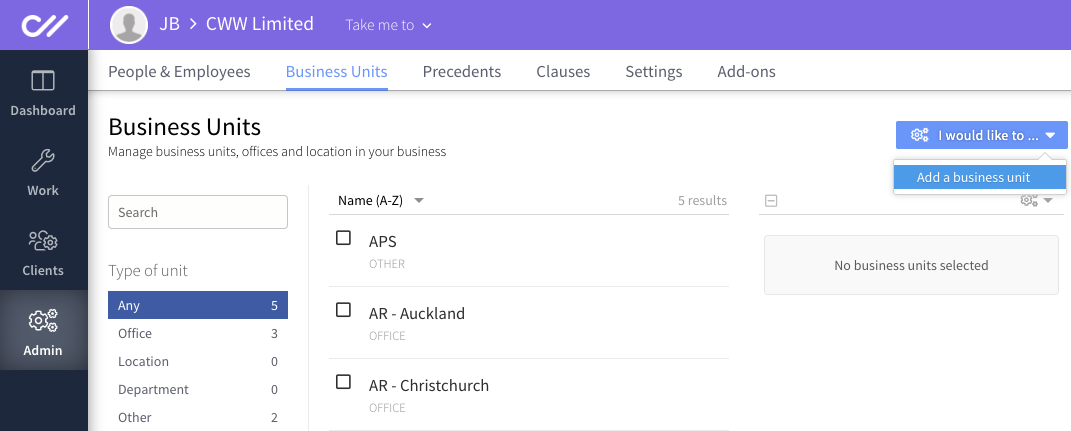
Fill out the name and type of business unit, give it a brief description and click **Create**.
The business unit you created will now appear in the **Business Units** list and will be available to assign to staff and clients.
### Assigning staff to business units
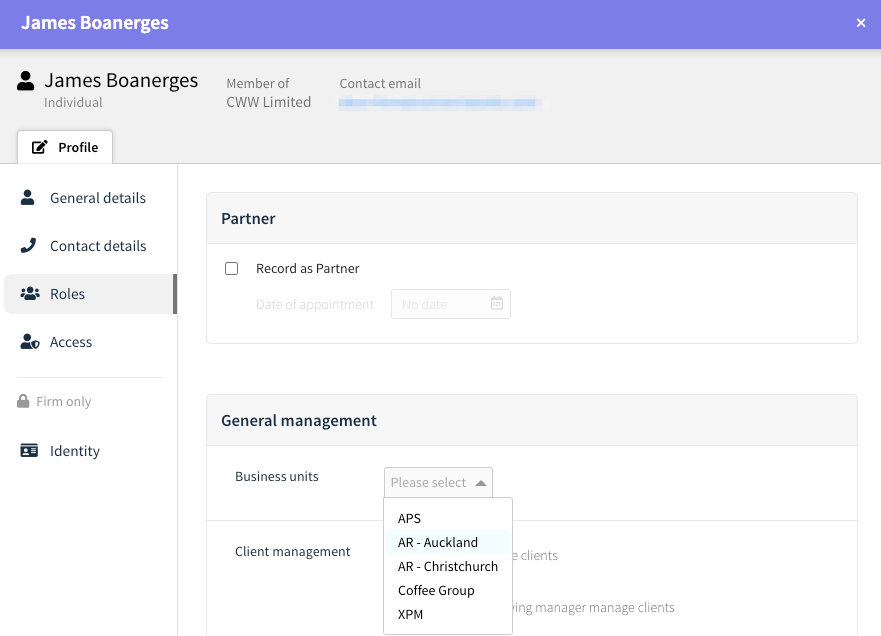
You can assign a staff member to a business unit by [editing the staff member's profile](https://support.connectworks.com/5608048-creating-editing-and-removing-staff-profiles?hsLang=en).
1. Go to the firm's **Admin tab**.
2. Select **edit** for the person you want to assign to a business unit.
3. In the **roles** section of the edit profile form select the business unit you want to assign from the drop-down menu, and then **Update and close**.
### Assigning clients to business units
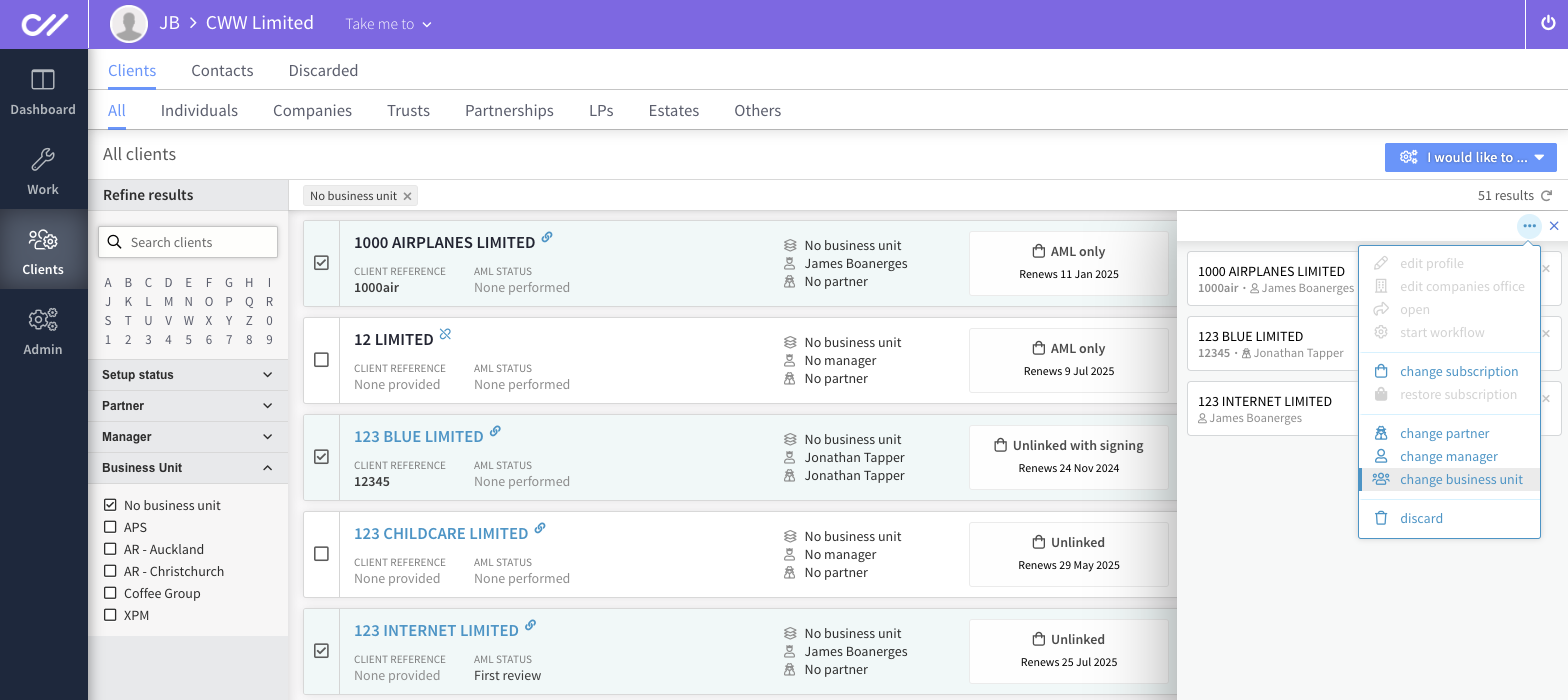
To assign clients to business units, go to the **Clients** **tab**, select the clients you wish to assign to a particular unit, then click the "**...**" symbol in the top right corner of the slide-out panel and select **Change Business Unit**. You can perform this action on multiple clients simultaneously.
### Filtering clients by business unit
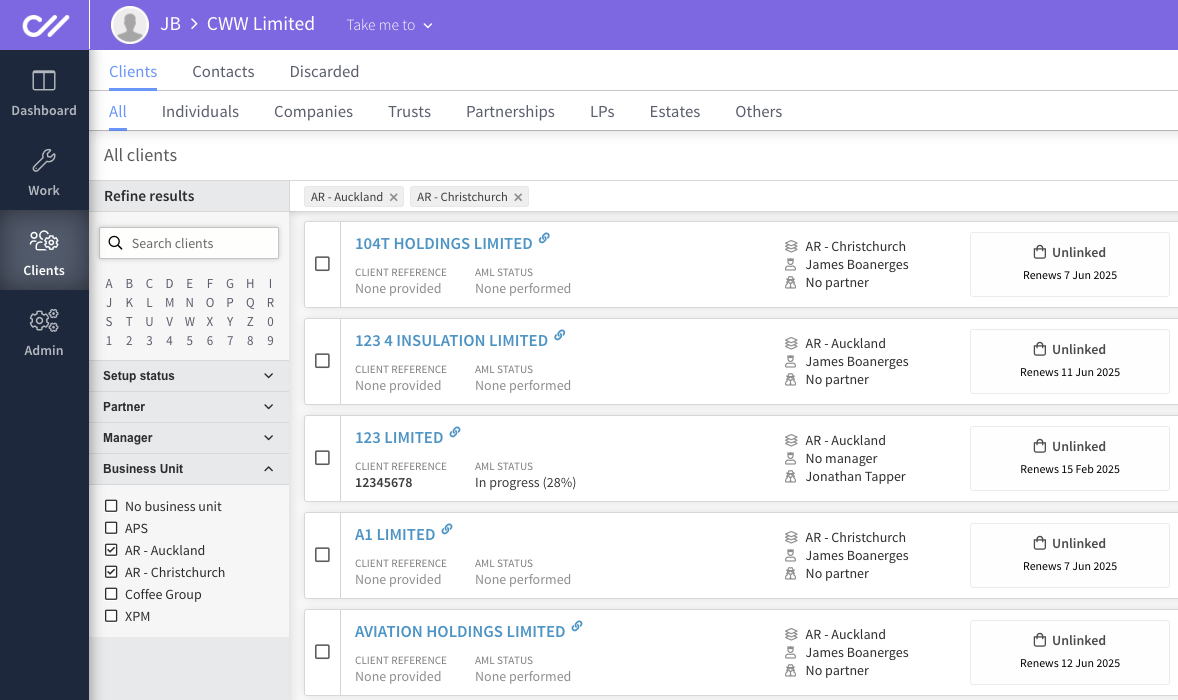
You can filter your list of clients to see just those belonging to your different business units. To do this, go to the **Clients** tab, select the client type you want to view, and then use the **Business Unit** filter in the left-hand column.
### Editing business units
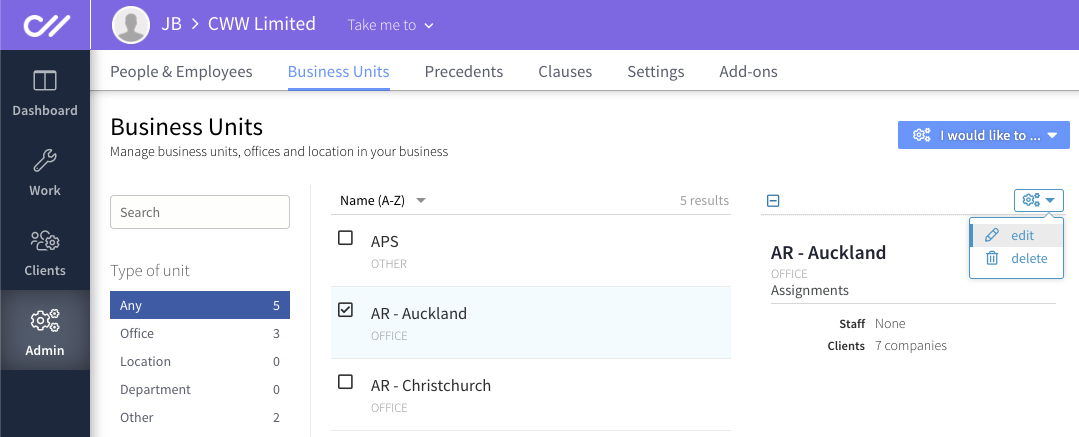
To edit the details for a business unit, go to the **Business Units** section of your firm's **Admin** tab, select the business unit you want to edit, click the cogs, and click *edit.*
**
- [Getting started](https://support.connectworks.com/getting-started?hsLang=en#main-content)
- [GETTING STARTED FOR PROFESSIONAL FIRMS](https://support.connectworks.com/getting-started?hsLang=en#getting-started-for-professional-firms)
- [LOADING CLIENT PROFILES](https://support.connectworks.com/getting-started?hsLang=en#loading-client-profiles)
- [SUBSCRIPTIONS & PRICING](https://support.connectworks.com/getting-started?hsLang=en#subscriptions-pricing)
- [Firm administration](https://support.connectworks.com/firm-administration?hsLang=en#main-content)
- [STAFF MANAGEMENT](https://support.connectworks.com/firm-administration?hsLang=en#staff-management)
- [GENERAL ADMINISTRATION](https://support.connectworks.com/firm-administration?hsLang=en#general-administration)
- [DOCUMENT MANAGEMENT ADD-ON](https://support.connectworks.com/firm-administration?hsLang=en#document-management-add-on)
- [PRACTICE MANAGER ADD-ONS](https://support.connectworks.com/firm-administration?hsLang=en#practice-manager-add-ons)
- [NZ COMPANIES OFFICE INTEGRATION](https://support.connectworks.com/firm-administration?hsLang=en#nz-companies-office-integration)
- [SECURITY](https://support.connectworks.com/firm-administration?hsLang=en#security)
- [AML Compliance](https://support.connectworks.com/aml-compliance?hsLang=en#main-content)
- [AML WORKFLOW](https://support.connectworks.com/aml-compliance?hsLang=en#aml-workflow)
- [CLIENT DUE DILIGENCE](https://support.connectworks.com/aml-compliance?hsLang=en#client-due-diligence)
- [ELECTRONIC VERIFICATION](https://support.connectworks.com/aml-compliance?hsLang=en#electronic-verification)
- [AML RESOURCES](https://support.connectworks.com/aml-compliance?hsLang=en#aml-resources)
- [Company Management (Getting Started and Annual Returns)](https://support.connectworks.com/company-management-getting-started-and-annual-returns?hsLang=en#main-content)
- [GETTING STARTED WITH COMPANIES](https://support.connectworks.com/company-management-getting-started-and-annual-returns?hsLang=en#getting-started-with-companies)
- [MANAGING COMPANY ROLES & ASSOCIATIONS](https://support.connectworks.com/company-management-getting-started-and-annual-returns?hsLang=en#managing-company-roles-associations)
- [COMPANY MANAGEMENT (OTHER)](https://support.connectworks.com/company-management-getting-started-and-annual-returns?hsLang=en#company-management-other)
- [THE ANNUAL RETURN WORKFLOW](https://support.connectworks.com/company-management-getting-started-and-annual-returns?hsLang=en#the-annual-return-workflow)
- [ANNUAL RETURNS (OTHER)](https://support.connectworks.com/company-management-getting-started-and-annual-returns?hsLang=en#annual-returns-other)
- [Company Management (Share Management)](https://support.connectworks.com/company-management-share-management?hsLang=en#main-content)
- [SHARE REGISTER](https://support.connectworks.com/company-management-share-management?hsLang=en#share-register)
- [Trust Management](https://support.connectworks.com/trust-management?hsLang=en#main-content)
- [GETTING STARTED WITH TRUSTS](https://support.connectworks.com/trust-management?hsLang=en#getting-started-with-trusts)
- [ASSOCIATED PARTIES (TRUSTS)](https://support.connectworks.com/trust-management?hsLang=en#associated-parties-trusts)
- [ASSETS & LIABILITIES](https://support.connectworks.com/trust-management?hsLang=en#assets-liabilities)
- [Entity Types](https://support.connectworks.com/entity-types?hsLang=en#main-content)
- [INDIVIDUALS](https://support.connectworks.com/entity-types?hsLang=en#individuals)
- [ESTATES](https://support.connectworks.com/entity-types?hsLang=en#estates)
- [PARTNERSHIPS](https://support.connectworks.com/entity-types?hsLang=en#partnerships)
- [LPs](https://support.connectworks.com/entity-types?hsLang=en#lps)
- [Document Management & Client Engagement](https://support.connectworks.com/document-management-client-engagement?hsLang=en#main-content)
- [CLIENT ENGAGEMENT](https://support.connectworks.com/document-management-client-engagement?hsLang=en#client-engagement)
- [DOCUMENT GENERATION FROM PRECEDENTS](https://support.connectworks.com/document-management-client-engagement?hsLang=en#document-generation-from-precedents)
- [DOCUMENT MANAGEMENT](https://support.connectworks.com/document-management-client-engagement?hsLang=en#document-management)
- [DOCUMENT SHARING & SIGNING](https://support.connectworks.com/document-management-client-engagement?hsLang=en#document-sharing-signing)
- [DOCUMENT PACKS](https://support.connectworks.com/document-management-client-engagement?hsLang=en#document-packs)
- [Non-professional user guide](https://support.connectworks.com/non-professional-user-guide?hsLang=en#main-content)
- [GETTING STARTED FOR NON-PROFESSIONAL USERS](https://support.connectworks.com/non-professional-user-guide?hsLang=en#getting-started-for-non-professional-users)
- [DOCUMENT MANAGEMENT FOR NON-PROFESSIONAL USERS](https://support.connectworks.com/non-professional-user-guide?hsLang=en#document-management-for-non-professional-users)
- Home
- Products
- Pricing
- Blog
- Company
[](http://connectworks.com)
[mailto:support@connectworks.com](mailto:support@connectworks.com)
Copyright © 2025, connectworks.com