---
title: Creating Profiles for Directors and Other Associated Parties
description: Creating Profiles for Directors and Other Associated Parties
---
[Skip to content](https://support.connectworks.com/5608279-creating-profiles-for-directors-and-other-associated-parties#main-content)
[](https://www.connectworks.com/)
Open main navigation
Close main navigation
How can we help you?
- There are no suggestions because the search field is empty.
1. [Help Center](https://support.connectworks.com/?hsLang=en)
2. [Company Management (Getting Started and Annual Returns)](https://support.connectworks.com/company-management-getting-started-and-annual-returns?hsLang=en)
3. [MANAGING COMPANY ROLES & ASSOCIATIONS](https://support.connectworks.com/company-management-getting-started-and-annual-returns?hsLang=en#managing-company-roles-associations)
# Creating Profiles for Directors and Other Associated Parties
## Creating Profiles for Directors and Other Associated Parties
This article will outline how to add people (or other entities) to Client profiles and assign their roles to those entities. This creates a new contact profile, which can appear in your contacts list. If the contact already exists as part of another entity you manage, you will be prompted to search for them first to prevent creating duplicate profiles.
The process for adding shareholders is different. See our articles: [Issuing Shares](https://support.connectworks.com/5614548-issuing-shares?hsLang=en) or [Transferring Shares](https://support.connectworks.com/5614553-transferring-shares?hsLang=en).
### Contents
1\. [Director appointments and resignations](https://support.connectworks.com/5608279-creating-profiles-for-directors-and-other-associated-parties#director)
2\. [Quick edit to add associated parties](https://support.connectworks.com/5608279-creating-profiles-for-directors-and-other-associated-parties#Quick)
3\. [Adding associations to Company Profiles](https://support.connectworks.com/5608279-creating-profiles-for-directors-and-other-associated-parties#Adding)
### Director appointments and resignations
Director appointments and resignations are updated **automatically** based on data from the **NZ Companies Office**. When a change is filed, the relevant Director's profile and their association with the Company will update automatically, with no action required from your team.
> **Note:** You cannot manually add or remove a person as a Director. All Director changes are managed via the NZ Companies Office integration.
You will be notified of Director changes through the Updates Tab.
### Quick edit to add associated parties
This feature allows users to add associated party relationships to entities via the quick edit link in the main Client gallery. This includes adding parties to entities subscribed on the AML-only plan and non-client entities recorded in your firm's Contacts list (due to being shareholders of your client companies).
To add associated parties to any entity type using quick edit:
1\. Locate the profile in your firm's Clients tab
2\. Hover over the profile and then choose edit
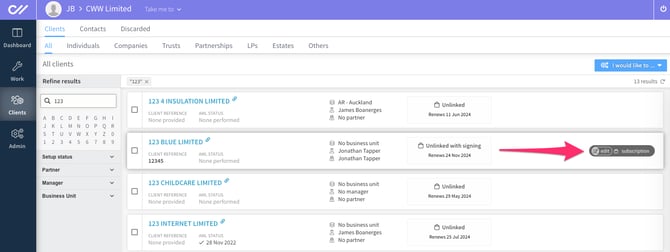
3\. Navigate to the Associated Parties tab of the edit form.
4\. Select Add party.
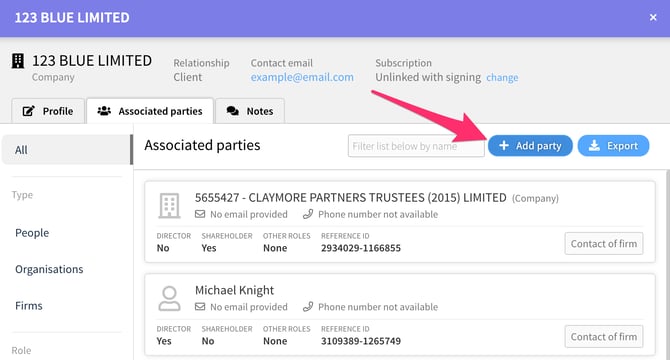
5\. Search for the person (or entity) you want to add as an associate. If they appear in the list below, add them to the profile.

6\. If they don't appear, select "Manually create a new party" to create a new contact profile.
### Adding associations to Company Profiles
1. Within the Company profile, navigate to the **Parties** tab.
1. Select the **Add Person** button at the top right of the Parties page to add a person.
2. To add a Company - if the Company is a shareholder, follow the process of [Changing Parties in a Share Allocation](https://support.connectworks.com/5666844-changing-parties-in-a-share-allocation?hsLang=en)
2. For **existing relationships,** you can search for the party in the firm's contacts; if they appear, click **Select**.
3. **Manually create a new party;** if the person or entity does not have a profile in the firm, select the 'Add new instead' option.
1. Confirm or update the **General details** and select **next**,
2. Confirm the A**ccess rights (custom)**
4. Select '**Add**' if you add a person with no additional roles.
5. Select '**Add and edit**' to update the person's roles within the Company.
6. Once all details have been added to the form, select **Update and Close** to add the party to the Company.
- [Getting started](https://support.connectworks.com/getting-started?hsLang=en#main-content)
- [GETTING STARTED FOR PROFESSIONAL FIRMS](https://support.connectworks.com/getting-started?hsLang=en#getting-started-for-professional-firms)
- [LOADING CLIENT PROFILES](https://support.connectworks.com/getting-started?hsLang=en#loading-client-profiles)
- [SUBSCRIPTIONS & PRICING](https://support.connectworks.com/getting-started?hsLang=en#subscriptions-pricing)
- [Firm administration](https://support.connectworks.com/firm-administration?hsLang=en#main-content)
- [STAFF MANAGEMENT](https://support.connectworks.com/firm-administration?hsLang=en#staff-management)
- [GENERAL ADMINISTRATION](https://support.connectworks.com/firm-administration?hsLang=en#general-administration)
- [DOCUMENT MANAGEMENT ADD-ON](https://support.connectworks.com/firm-administration?hsLang=en#document-management-add-on)
- [PRACTICE MANAGER ADD-ONS](https://support.connectworks.com/firm-administration?hsLang=en#practice-manager-add-ons)
- [NZ COMPANIES OFFICE INTEGRATION](https://support.connectworks.com/firm-administration?hsLang=en#nz-companies-office-integration)
- [SECURITY](https://support.connectworks.com/firm-administration?hsLang=en#security)
- [AML Compliance](https://support.connectworks.com/aml-compliance?hsLang=en#main-content)
- [AML WORKFLOW](https://support.connectworks.com/aml-compliance?hsLang=en#aml-workflow)
- [CLIENT DUE DILIGENCE](https://support.connectworks.com/aml-compliance?hsLang=en#client-due-diligence)
- [ELECTRONIC VERIFICATION](https://support.connectworks.com/aml-compliance?hsLang=en#electronic-verification)
- [AML RESOURCES](https://support.connectworks.com/aml-compliance?hsLang=en#aml-resources)
- [Company Management (Getting Started and Annual Returns)](https://support.connectworks.com/company-management-getting-started-and-annual-returns?hsLang=en#main-content)
- [GETTING STARTED WITH COMPANIES](https://support.connectworks.com/company-management-getting-started-and-annual-returns?hsLang=en#getting-started-with-companies)
- [MANAGING COMPANY ROLES & ASSOCIATIONS](https://support.connectworks.com/company-management-getting-started-and-annual-returns?hsLang=en#managing-company-roles-associations)
- [COMPANY MANAGEMENT (OTHER)](https://support.connectworks.com/company-management-getting-started-and-annual-returns?hsLang=en#company-management-other)
- [THE ANNUAL RETURN WORKFLOW](https://support.connectworks.com/company-management-getting-started-and-annual-returns?hsLang=en#the-annual-return-workflow)
- [ANNUAL RETURNS (OTHER)](https://support.connectworks.com/company-management-getting-started-and-annual-returns?hsLang=en#annual-returns-other)
- [Company Management (Share Management)](https://support.connectworks.com/company-management-share-management?hsLang=en#main-content)
- [SHARE REGISTER](https://support.connectworks.com/company-management-share-management?hsLang=en#share-register)
- [Trust Management](https://support.connectworks.com/trust-management?hsLang=en#main-content)
- [GETTING STARTED WITH TRUSTS](https://support.connectworks.com/trust-management?hsLang=en#getting-started-with-trusts)
- [ASSOCIATED PARTIES (TRUSTS)](https://support.connectworks.com/trust-management?hsLang=en#associated-parties-trusts)
- [ASSETS & LIABILITIES](https://support.connectworks.com/trust-management?hsLang=en#assets-liabilities)
- [Entity Types](https://support.connectworks.com/entity-types?hsLang=en#main-content)
- [INDIVIDUALS](https://support.connectworks.com/entity-types?hsLang=en#individuals)
- [ESTATES](https://support.connectworks.com/entity-types?hsLang=en#estates)
- [PARTNERSHIPS](https://support.connectworks.com/entity-types?hsLang=en#partnerships)
- [LPs](https://support.connectworks.com/entity-types?hsLang=en#lps)
- [Document Management & Client Engagement](https://support.connectworks.com/document-management-client-engagement?hsLang=en#main-content)
- [CLIENT ENGAGEMENT](https://support.connectworks.com/document-management-client-engagement?hsLang=en#client-engagement)
- [DOCUMENT GENERATION FROM PRECEDENTS](https://support.connectworks.com/document-management-client-engagement?hsLang=en#document-generation-from-precedents)
- [DOCUMENT MANAGEMENT](https://support.connectworks.com/document-management-client-engagement?hsLang=en#document-management)
- [DOCUMENT SHARING & SIGNING](https://support.connectworks.com/document-management-client-engagement?hsLang=en#document-sharing-signing)
- [DOCUMENT PACKS](https://support.connectworks.com/document-management-client-engagement?hsLang=en#document-packs)
- [Non-professional user guide](https://support.connectworks.com/non-professional-user-guide?hsLang=en#main-content)
- [GETTING STARTED FOR NON-PROFESSIONAL USERS](https://support.connectworks.com/non-professional-user-guide?hsLang=en#getting-started-for-non-professional-users)
- [DOCUMENT MANAGEMENT FOR NON-PROFESSIONAL USERS](https://support.connectworks.com/non-professional-user-guide?hsLang=en#document-management-for-non-professional-users)
- Home
- Products
- Pricing
- Blog
- Company
[](http://connectworks.com)
[mailto:support@connectworks.com](mailto:support@connectworks.com)
Copyright © 2025, connectworks.com