---
title: What Invited Trust Clients Can See & Do
description: How associated parties of trusts can be invited to access Connectworks
---
[Skip to content](https://support.connectworks.com/5659794-what-invited-trust-clients-can-see-do#main-content)
[](https://www.connectworks.com/)
Open main navigation
Close main navigation
How can we help you?
- There are no suggestions because the search field is empty.
1. [Help Center](https://support.connectworks.com/?hsLang=en)
2. [Document Management & Client Engagement](https://support.connectworks.com/document-management-client-engagement?hsLang=en)
3. [CLIENT ENGAGEMENT](https://support.connectworks.com/document-management-client-engagement?hsLang=en#client-engagement)
# What Invited Trust Clients Can See & Do
## How associated parties of trusts can be invited to access Connectworks
This article explains how the trustees, beneficiaries, trust advisors, and other parties associated with your client trusts can be [invited to access](https://support.connectworks.com/5659868-how-to-invite-clients-into-connectworks?hsLang=en)their Trust Workspace and work collaboratively with your firm in Connectworks.
Non-professional users of Connectworks (ie. invited clients) cannot access/generate documents from precedents.
For information on the user roles and access rights for staff at your professional firm see our article [here](https://23542228.hs-sites.com/knowledge/staff-access-rights?hsLang=en).
### Contents
1. [Accessing a trust as a trustee or associated party of the trust](https://support.connectworks.com/5659794-what-invited-trust-clients-can-see-do#Accessing)
2. [What Trustees can see and do](https://support.connectworks.com/5659794-what-invited-trust-clients-can-see-do#Trustees)
3. [What Beneficiaries can see and do](https://support.connectworks.com/5659794-what-invited-trust-clients-can-see-do#Beneficiaries)
4. [What other Associated Parties can see and do](https://support.connectworks.com/5659794-what-invited-trust-clients-can-see-do#AssociatedParties)
5. [What Trust Advisors can see and do](https://support.connectworks.com/5659794-what-invited-trust-clients-can-see-do#Advisors)
6. [What Trust Administrators can see and do](https://support.connectworks.com/5659794-what-invited-trust-clients-can-see-do#Administrators)
7. [Setting access rights when creating a Trustee or other Associated Party](https://support.connectworks.com/5659794-what-invited-trust-clients-can-see-do#Setting)
8. [Editing access rights for a Trustee or other Associated Party](https://support.connectworks.com/5659794-what-invited-trust-clients-can-see-do#Editing)
### Accessing a trust as a trustee or associated party of the trust
Under [Unlinked subscription plans](https://support.connectworks.com/5590526-all-subscription-plans-and-pricing?hsLang=en), the full Trust Workspace can only be accessed by members of the subscribing firm.
Where a client trust is subscribed under an [Unlimited subscription](https://support.connectworks.com/5590526-all-subscription-plans-and-pricing?hsLang=en), however, the subscribing firm can extend access to the trust to as many parties as they wish. Persons outside your firm who can be extended access to a trust fall into five categories:
- Trustees
- Beneficiaries
- Associated Parties
- Trust Advisors
- Trust Administrators
### What Trustees can see and do
By default, the Trustees of a trust you have invited into Connectworks can see and do everything your manager for the trust can see and do, apart from:
- Trustees can create discussions in the Minute book, but **cannot create minutes or resolutions**
- Trustees **cannot** download or merge precedents
- Trustees **cannot** upload documents to the document repository
- Trustees **cannot** add, remove, or edit the profiles of parties associated with the Trust
- Trustees **cannot** edit the trust’s profile
As you will see below, however, the permissions for a particular trustee can be modified, allowing Trustees to perform any action up to and including those available to your firm's trust manager.
### What Beneficiaries can see and do
The beneficiary role does not come with any default user permissions. As such, individuals recorded as Beneficiaries by default cannot perform any actions on the Trust.
If invited into Connectworks, beneficiaries can access the trust but are only able to view the trust profile and the list of parties associated with the Trust.
However, if you wish to, the access rights and permissions for a particular beneficiary can be modified, allowing them to perform any action up to and including those available to your firm's trust manager.
### What other Associated Parties can see and do
You can record individuals associated with a Trust in a range of constituent roles, including:
- Settlor
- Protector
- Appointer (trustee and beneficiary)
- Executor
These roles do not come with any default user permissions. As such, individuals recorded under these roles cannot by default perform any actions on the Trust. If invited into Connectworks, these users can access the trust but are only able to view the trust profile and the list of parties associated with the Trust.
However, if you wish to, the access rights and permissions for a particular user in one of these roles can be modified, to allow them to perform any action up to and including those available to your firm's trust manager.
### What Trust Advisors Can See and Do
You can record individuals associated with a Trust in a range of advisory roles, including:
- Legal advisor or lawyer
- Accounting advisor or accountant
- Financial Advisor
- Advisor to the trustees (Advisory Trustee)
- Other advisor
- Treasurer
- Secretary
By default, **Legal**, **Accounting**, and **Other** Advisors can see and do everything your manager for the trust can see and do, apart from:
- They can create discussions in the Minute book, but **cannot create minutes or resolutions**
- They **cannot** download or merge precedents
- They **cannot** upload documents to the document repository
- They **cannot** add, remove, or edit the profiles of parties associated with the Trust
- They **cannot** edit the trust’s profile
The roles of **Advisor** to the **trustees**, **Treasurer**, and **Secretary**, do not come with any default user permissions. As such, individuals recorded under these roles *cannot* by default perform any actions on the Trust. If invited into Connectworks, these users can access the trust but are only able to view the trust profile and the list of parties associated with the Trust.
However, if you wish to, the access rights and permissions for a particular user in one of these roles can be modified, allowing them to perform any action up to and including those available to your firm's trust manager.
### What Trust Administrators Can See and Do
If you or the trustees wish, you can grant anyone associated with a trust Administrator access. This gives the user full access to the trust, allowing them to see and do everything your firm's trust manager can, except generating precedents - this functionality is only available to professional firm staff accessing Connectworks via their Firm Workspace.
### Setting access rights when creating a Trustee or other Associated Party
You can set the access rights for a Trustee, Administrator or Advisor when you create their profile or edit them later as described below.
### Editing access rights for a Trustee or other Associated Party
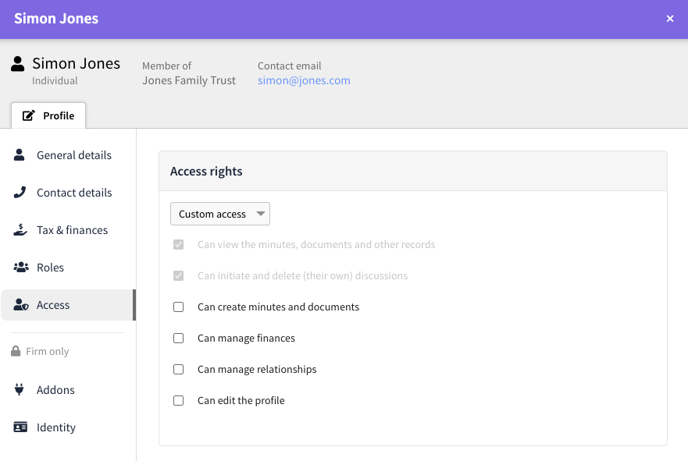
You can edit the access rights for persons associated with a trust from within the trust workspace. In particular, you can grant them the ability to create minutes and documents, manage relationships, and edit the trust profile.
In the **Parties** tab, select edit for the party whose access rights you want to update, then assign their access level in the edit form's access rights section.
Greyed-out access rights cannot be removed. These rights are automatically granted due to their assigned role in the trust.
- [Getting started](https://support.connectworks.com/getting-started?hsLang=en#main-content)
- [GETTING STARTED FOR PROFESSIONAL FIRMS](https://support.connectworks.com/getting-started?hsLang=en#getting-started-for-professional-firms)
- [LOADING CLIENT PROFILES](https://support.connectworks.com/getting-started?hsLang=en#loading-client-profiles)
- [SUBSCRIPTIONS & PRICING](https://support.connectworks.com/getting-started?hsLang=en#subscriptions-pricing)
- [Firm administration](https://support.connectworks.com/firm-administration?hsLang=en#main-content)
- [STAFF MANAGEMENT](https://support.connectworks.com/firm-administration?hsLang=en#staff-management)
- [GENERAL ADMINISTRATION](https://support.connectworks.com/firm-administration?hsLang=en#general-administration)
- [DOCUMENT MANAGEMENT ADD-ON](https://support.connectworks.com/firm-administration?hsLang=en#document-management-add-on)
- [PRACTICE MANAGER ADD-ONS](https://support.connectworks.com/firm-administration?hsLang=en#practice-manager-add-ons)
- [NZ COMPANIES OFFICE INTEGRATION](https://support.connectworks.com/firm-administration?hsLang=en#nz-companies-office-integration)
- [SECURITY](https://support.connectworks.com/firm-administration?hsLang=en#security)
- [AML Compliance](https://support.connectworks.com/aml-compliance?hsLang=en#main-content)
- [AML WORKFLOW](https://support.connectworks.com/aml-compliance?hsLang=en#aml-workflow)
- [CLIENT DUE DILIGENCE](https://support.connectworks.com/aml-compliance?hsLang=en#client-due-diligence)
- [ELECTRONIC VERIFICATION](https://support.connectworks.com/aml-compliance?hsLang=en#electronic-verification)
- [AML RESOURCES](https://support.connectworks.com/aml-compliance?hsLang=en#aml-resources)
- [Company Management (Getting Started and Annual Returns)](https://support.connectworks.com/company-management-getting-started-and-annual-returns?hsLang=en#main-content)
- [GETTING STARTED WITH COMPANIES](https://support.connectworks.com/company-management-getting-started-and-annual-returns?hsLang=en#getting-started-with-companies)
- [MANAGING COMPANY ROLES & ASSOCIATIONS](https://support.connectworks.com/company-management-getting-started-and-annual-returns?hsLang=en#managing-company-roles-associations)
- [COMPANY MANAGEMENT (OTHER)](https://support.connectworks.com/company-management-getting-started-and-annual-returns?hsLang=en#company-management-other)
- [THE ANNUAL RETURN WORKFLOW](https://support.connectworks.com/company-management-getting-started-and-annual-returns?hsLang=en#the-annual-return-workflow)
- [ANNUAL RETURNS (OTHER)](https://support.connectworks.com/company-management-getting-started-and-annual-returns?hsLang=en#annual-returns-other)
- [Company Management (Share Management)](https://support.connectworks.com/company-management-share-management?hsLang=en#main-content)
- [SHARE REGISTER](https://support.connectworks.com/company-management-share-management?hsLang=en#share-register)
- [Trust Management](https://support.connectworks.com/trust-management?hsLang=en#main-content)
- [GETTING STARTED WITH TRUSTS](https://support.connectworks.com/trust-management?hsLang=en#getting-started-with-trusts)
- [ASSOCIATED PARTIES (TRUSTS)](https://support.connectworks.com/trust-management?hsLang=en#associated-parties-trusts)
- [ASSETS & LIABILITIES](https://support.connectworks.com/trust-management?hsLang=en#assets-liabilities)
- [Entity Types](https://support.connectworks.com/entity-types?hsLang=en#main-content)
- [INDIVIDUALS](https://support.connectworks.com/entity-types?hsLang=en#individuals)
- [ESTATES](https://support.connectworks.com/entity-types?hsLang=en#estates)
- [PARTNERSHIPS](https://support.connectworks.com/entity-types?hsLang=en#partnerships)
- [LPs](https://support.connectworks.com/entity-types?hsLang=en#lps)
- [Document Management & Client Engagement](https://support.connectworks.com/document-management-client-engagement?hsLang=en#main-content)
- [CLIENT ENGAGEMENT](https://support.connectworks.com/document-management-client-engagement?hsLang=en#client-engagement)
- [DOCUMENT GENERATION FROM PRECEDENTS](https://support.connectworks.com/document-management-client-engagement?hsLang=en#document-generation-from-precedents)
- [DOCUMENT MANAGEMENT](https://support.connectworks.com/document-management-client-engagement?hsLang=en#document-management)
- [DOCUMENT SHARING & SIGNING](https://support.connectworks.com/document-management-client-engagement?hsLang=en#document-sharing-signing)
- [DOCUMENT PACKS](https://support.connectworks.com/document-management-client-engagement?hsLang=en#document-packs)
- [Non-professional user guide](https://support.connectworks.com/non-professional-user-guide?hsLang=en#main-content)
- [GETTING STARTED FOR NON-PROFESSIONAL USERS](https://support.connectworks.com/non-professional-user-guide?hsLang=en#getting-started-for-non-professional-users)
- [DOCUMENT MANAGEMENT FOR NON-PROFESSIONAL USERS](https://support.connectworks.com/non-professional-user-guide?hsLang=en#document-management-for-non-professional-users)
- Home
- Products
- Pricing
- Blog
- Company
[](http://connectworks.com)
[mailto:support@connectworks.com](mailto:support@connectworks.com)
Copyright © 2025, connectworks.com