---
title: "Client advises of changes: Workflow step 3 - Review Response"
description: Step 5 - The annual return workflow
---
[Skip to content](https://support.connectworks.com/5670399-5-client-advises-of-address-changes-workflow-step-3-review-response#main-content)
[](https://www.connectworks.com/)
Open main navigation
Close main navigation
How can we help you?
- There are no suggestions because the search field is empty.
1. [Help Center](https://support.connectworks.com/?hsLang=en)
2. [Company Management (Getting Started and Annual Returns)](https://support.connectworks.com/company-management-getting-started-and-annual-returns?hsLang=en)
3. [THE ANNUAL RETURN WORKFLOW](https://support.connectworks.com/company-management-getting-started-and-annual-returns?hsLang=en#the-annual-return-workflow)
# Client advises of changes: Workflow step 3 - Review Response
## Step 5 - The annual return workflow
When a client responds to the annual return verification advising that there have been changes, the company will be placed in the workflow step “3 -review response”.
Changes have to be manually applied before filing the return. Director, Shareholder and Company Addresses can be simultaneously updated at the Companies Office via Connectworks during this process.
### Contents
[How to review client responses](https://support.connectworks.com/5670399-5-client-advises-of-address-changes-workflow-step-3-review-response#review)
[Directors & Shareholders addresses](https://support.connectworks.com/5670399-5-client-advises-of-address-changes-workflow-step-3-review-response#addresses)
[Shareholder Updates](https://support.connectworks.com/5670399-5-client-advises-of-address-changes-workflow-step-3-review-response#updates)
[Registered Office, Address for Service and other company-specific addresses](https://support.connectworks.com/5670399-5-client-advises-of-address-changes-workflow-step-3-review-response#registered)
### How to review client responses
1\. Filter the Annual Returns workflow in the left column by selecting:
- ***Filing obligation --\>*** Files return
- ***Filing month --\>*** This month
- ***Filing status --\>*** Needs attention
- ***Workflow step --\>*** Review response
Now all the companies in the list will appear showing the workflow step "3 - Review Response"
You need to work through each company individually, review each client response, update the information and then file the return. To do this:
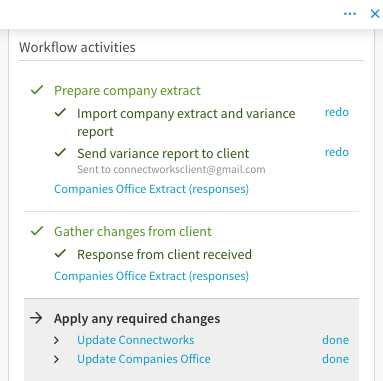
2\. Select the Company (by clicking on the tickbox of the company in the list). The annual return workflow will appear as a slide-out on the right-hand side. Scroll down to 'Workflow Activities', Select “Gather changes from client” and then select “Companies Office Extract (responses)”. You will be redirected to review the client's responses on another web page.
### **Directors & Shareholders addresses**
### Contents
0:00 Client advises of changes- (Director and Shareholder Addresses)
1:15 Apply any required changes: Update Connectworks
- 1:40 Contacts: Merging Individuals
- 2:28 Contacts: Updating information manually
- 3:43 Contacts: APS/XPM linking and syncing
5:25 Apply any required changes: Update Companies Office
### Shareholder Updates
### Contents
0:00 Client advises of changes: (Shareholder Updates)
0:48 Apply any required changes: Update Connectworks
3:59 Apply any required changes: Update Companies Office
The following articles were referenced in the above webinar
- [Company Management (Share Management)](https://support.connectworks.com/company-management-share-management?hsLang=en)
### **Registered Office, Address for Service and other company-specific addresses**
These addresses can be updated in several ways and will update at the Companies Office.
To update this company address information, click "edit Companies Office' under "I would like to" from the Company Workspace tab. In the details tab, this will allow you to update the appropriate addresses.
To update multiple company address information, please contact [support@connectworks.com](mailto:support@connectworks.com) and we'll guide you through the bulk update process. There are several reasons (change of address, change of firm name etc) to update multiple Company office addresses.
### Next step:
- [Non-responsive clients: Resending annual return verification extract](https://support.connectworks.com/5670409-6-non-responsive-clients-resending-annual-return-verification-extract?hsLang=en)
- [Getting started](https://support.connectworks.com/getting-started?hsLang=en#main-content)
- [GETTING STARTED FOR PROFESSIONAL FIRMS](https://support.connectworks.com/getting-started?hsLang=en#getting-started-for-professional-firms)
- [LOADING CLIENT PROFILES](https://support.connectworks.com/getting-started?hsLang=en#loading-client-profiles)
- [SUBSCRIPTIONS & PRICING](https://support.connectworks.com/getting-started?hsLang=en#subscriptions-pricing)
- [Firm administration](https://support.connectworks.com/firm-administration?hsLang=en#main-content)
- [STAFF MANAGEMENT](https://support.connectworks.com/firm-administration?hsLang=en#staff-management)
- [GENERAL ADMINISTRATION](https://support.connectworks.com/firm-administration?hsLang=en#general-administration)
- [DOCUMENT MANAGEMENT ADD-ON](https://support.connectworks.com/firm-administration?hsLang=en#document-management-add-on)
- [PRACTICE MANAGER ADD-ONS](https://support.connectworks.com/firm-administration?hsLang=en#practice-manager-add-ons)
- [NZ COMPANIES OFFICE INTEGRATION](https://support.connectworks.com/firm-administration?hsLang=en#nz-companies-office-integration)
- [SECURITY](https://support.connectworks.com/firm-administration?hsLang=en#security)
- [AML Compliance](https://support.connectworks.com/aml-compliance?hsLang=en#main-content)
- [AML WORKFLOW](https://support.connectworks.com/aml-compliance?hsLang=en#aml-workflow)
- [CLIENT DUE DILIGENCE](https://support.connectworks.com/aml-compliance?hsLang=en#client-due-diligence)
- [ELECTRONIC VERIFICATION](https://support.connectworks.com/aml-compliance?hsLang=en#electronic-verification)
- [AML RESOURCES](https://support.connectworks.com/aml-compliance?hsLang=en#aml-resources)
- [Company Management (Getting Started and Annual Returns)](https://support.connectworks.com/company-management-getting-started-and-annual-returns?hsLang=en#main-content)
- [GETTING STARTED WITH COMPANIES](https://support.connectworks.com/company-management-getting-started-and-annual-returns?hsLang=en#getting-started-with-companies)
- [MANAGING COMPANY ROLES & ASSOCIATIONS](https://support.connectworks.com/company-management-getting-started-and-annual-returns?hsLang=en#managing-company-roles-associations)
- [COMPANY MANAGEMENT (OTHER)](https://support.connectworks.com/company-management-getting-started-and-annual-returns?hsLang=en#company-management-other)
- [THE ANNUAL RETURN WORKFLOW](https://support.connectworks.com/company-management-getting-started-and-annual-returns?hsLang=en#the-annual-return-workflow)
- [ANNUAL RETURNS (OTHER)](https://support.connectworks.com/company-management-getting-started-and-annual-returns?hsLang=en#annual-returns-other)
- [Company Management (Share Management)](https://support.connectworks.com/company-management-share-management?hsLang=en#main-content)
- [SHARE REGISTER](https://support.connectworks.com/company-management-share-management?hsLang=en#share-register)
- [Trust Management](https://support.connectworks.com/trust-management?hsLang=en#main-content)
- [GETTING STARTED WITH TRUSTS](https://support.connectworks.com/trust-management?hsLang=en#getting-started-with-trusts)
- [ASSOCIATED PARTIES (TRUSTS)](https://support.connectworks.com/trust-management?hsLang=en#associated-parties-trusts)
- [ASSETS & LIABILITIES](https://support.connectworks.com/trust-management?hsLang=en#assets-liabilities)
- [Entity Types](https://support.connectworks.com/entity-types?hsLang=en#main-content)
- [INDIVIDUALS](https://support.connectworks.com/entity-types?hsLang=en#individuals)
- [ESTATES](https://support.connectworks.com/entity-types?hsLang=en#estates)
- [PARTNERSHIPS](https://support.connectworks.com/entity-types?hsLang=en#partnerships)
- [LPs](https://support.connectworks.com/entity-types?hsLang=en#lps)
- [Document Management & Client Engagement](https://support.connectworks.com/document-management-client-engagement?hsLang=en#main-content)
- [CLIENT ENGAGEMENT](https://support.connectworks.com/document-management-client-engagement?hsLang=en#client-engagement)
- [DOCUMENT GENERATION FROM PRECEDENTS](https://support.connectworks.com/document-management-client-engagement?hsLang=en#document-generation-from-precedents)
- [DOCUMENT MANAGEMENT](https://support.connectworks.com/document-management-client-engagement?hsLang=en#document-management)
- [DOCUMENT SHARING & SIGNING](https://support.connectworks.com/document-management-client-engagement?hsLang=en#document-sharing-signing)
- [DOCUMENT PACKS](https://support.connectworks.com/document-management-client-engagement?hsLang=en#document-packs)
- [Non-professional user guide](https://support.connectworks.com/non-professional-user-guide?hsLang=en#main-content)
- [GETTING STARTED FOR NON-PROFESSIONAL USERS](https://support.connectworks.com/non-professional-user-guide?hsLang=en#getting-started-for-non-professional-users)
- [DOCUMENT MANAGEMENT FOR NON-PROFESSIONAL USERS](https://support.connectworks.com/non-professional-user-guide?hsLang=en#document-management-for-non-professional-users)
- Home
- Products
- Pricing
- Blog
- Company
[](http://connectworks.com)
[mailto:support@connectworks.com](mailto:support@connectworks.com)
Copyright © 2025, connectworks.com